LILIN · Product & Sales Essentials
Don't replace what the customer already has
All three product lines come down to the same thing: what the customer has already paid for stays, and the new piece connects in to fill the part that was missing. The most important thing in the field is to get the brand and model of each device and bring them back.
Three product lines
Every card follows the same structure: what the customer will say, what you're selling, three benefits they'll understand, who buys, the opening question, and what to nail down.
LiveEdge
Body-worn cameras (BWC) plus the Nexus command centre — and it connects into the customer's existing VMS.
Three benefits
Animation: body-worn camera
Out in the field there are two modes. Live + Record: one press, and it records and streams back to the command centre at the same time. Buffer: normally everything stays on the device (including a pre-record from just before the press, with configurable length), and only when SOS is pressed does it alert the command centre, send the video back and open two-way talk. Location, meanwhile, goes straight to Nexus the whole time they're out.
Dashcam: 3D digital twin
The dashcam on a patrol car records front and rear as soon as the engine starts, stored only on the device; sharp turns and hard braking are just marked in the recording. Only a long-press on SOS or an impact alerts the command centre and sends the front and rear views back through Vault, and that clip can be set to go into Vault right away. Calls placed from the console are answered automatically. Back at base, the whole shift's recording uploads over Wi-Fi.
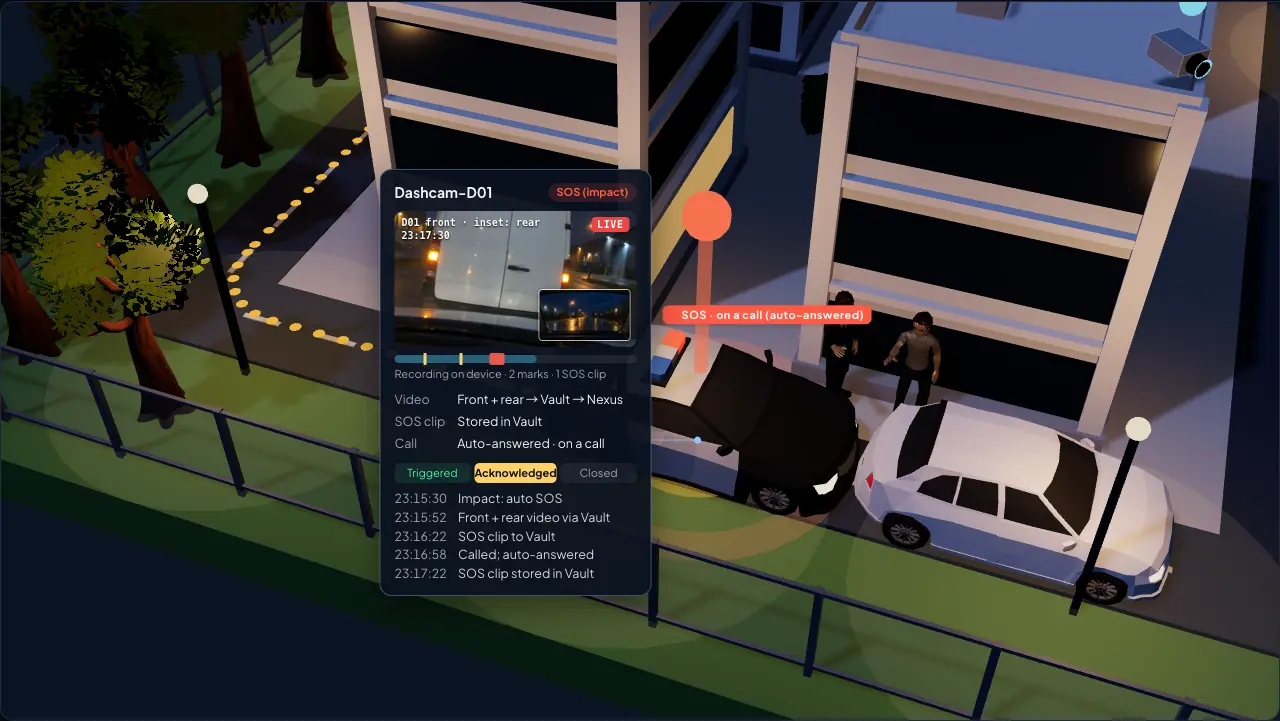 3D digital twin: patrol car crash SOSImpact triggers → front and rear feeds sent back, call answered automatically
How the architecture works: two scenarios
Indoors and out in the field, a body-worn camera takes two completely different paths. Once that is clear, the customer understands why both roles, Vault and Nexus, are needed.
Which path uses which protocol
| What's being sent | Protocol | From → to |
|---|---|---|
| Video on the move | RTMP | BWC → Vault |
| Live video for the command centre | WebRTC | Relayed by Vault → Nexus |
| Video for the customer's existing VMS | ONVIF · RTSP | Relayed by Vault → existing VMS |
| Location | HTTP POST | BWC → Nexus |
| Two-way talk (after SOS) | WebRTC | BWC ⇄ Nexus |
| Backfill after returning to the station | Booth | BWC → Booth → Vault |
What Vault does
- Ingest: over RTMP while on the move, backfilled from Booth after returning to the station
- Relay: converted to WebRTC for live viewing in Nexus; to the customer's existing VMS, each body-worn camera is an ONVIF camera
- Evidence management: automatic filing to cases, chain of custody, exportable audit logs
- Retention: automatic deletion at expiry, frozen when tied to a case
- Each licence includes 5 direct RTSP connections, so temporary fixed cameras can be brought in too
What Nexus does
- Live command: where people are (location comes in over HTTP POST) and what the scene looks like (WebRTC relayed by Vault)
- Two-way talk: WebRTC, with the service endpoint on the Nexus side
- Dispatch and reporting: assigning tasks, status reported back from the field
- Event handling: events come in, and the handling process and outcome are kept on record
XMap
Brings devices from every brand into one interface: map, event management and CMS. It sits on top of the customer's existing VMS, so the current system doesn't need replacing.
Three pillars
Map
Every point on one map, regardless of brand or site. When an alarm comes in, the map automatically zooms to its location, so whoever is on duty doesn't have to work out which camera it is.
Event Management
The extra layer on top of the map, built specifically for security companies: events come in, work is dispatched, SOPs are checked item by item, handling is kept on record, and reports come out afterwards. It's what security companies do every day, and usually the part customers value most.
CMS — monitoring management
Again, devices from every vendor are integrated. What the customer sees is one interface:
What it looks like once integrated
How far the integration goes
XMap supports LILIN and also Network Optix's Nx Witness, so devices from different systems can go on the same map. If the customer has other brands on site, there's only one thing to do in the field — bring the brand and model back to confirm.
A question that comes up often
When XMap goes into a project running another company's VMS, whose customer is it?
ResellerHub is an unlimited-tier structure: a customer belongs to whichever tier it sits under, that tier can use its own domain and logo, and the tiers above see only aggregate data — ownership and branding both stay with the original tier.
Merlink+with Merlin cloud
A software gateway installed on the customer's own machine that connects the cameras and recorders of every brand on site to the Merlin cloud — and also an on-site AI Operator that helps look after the equipment.
Three benefits
What the architecture looks like
How to answer “Can it connect to this?”
Every “can it connect to this?” from a customer gets the same answer. Don't decide in the field that something can't be done.
The main brands are already integrated — LILIN, Nx Witness and other major brands. For any other brand, all you need to do in the field is bring back the brand and model; you don't have to answer on the spot.
It isn't that it can't be done — it just hasn't been integrated yet, and that's homework still being done on the product side. Bring it back to confirm; only truly old equipment with no interface at all would go the side-recording route — and that's a fallback, not the main approach.
Again, integration comes first. If the device has its own event output, it simply gets integrated; old equipment without software events almost always still has a set of dry contacts, which connect to Merlink+ and become events that pop up on the map. Side recording plus AI is another option, but it comes after integration.
Two habits
- Lead with what works, then what needs confirming. “You'll be able to see all of your locations; a few of these units are older, so let me go back and confirm the best way to connect them” — don't open with “this one isn't supported.”
- Don't make the call on the spot. Whether something can connect isn't for the field to decide — bring the model back to confirm.
Two together are easier to sell than one alone
A single product solves a single pain point; put two together and the customer can see what “the whole picture” is worth. And when you discuss two together, customers are less likely to compare prices on just one of the features.
First use Merlink+ to bring in the equipment already installed at each site, then use XMap to put it all on one map, with event management and dispatch on top. What used to take a dozen or more systems to see becomes one screen. This pair is usually the easiest to sell, because neither one replaces any of the customer's existing equipment.
The point isn't one more command console, it's integration: the location and live video of patrol staff appear on the same map as the fixed cameras in the customer's existing VMS. The line that resonates most with customers: “Wherever my people go, the video goes with them — and it's on the same screen as my existing cameras.”
The core is XMap + Merlink+: Merlink+ takes in and looks after the equipment of every brand on site, XMap provides the map, events and CMS on top, and LiveEdge adds the mobile side. That's what a large project looks like, but there's no need to push the whole set at the start — solve one clear pain point with XMap + Merlink+ first, then build on it once it's up and running.
What customers will always ask
Answer this way — don't improvise on the spot.
“Do I have to replace my current system?”
No. All the devices and VMS the customer has already bought stay, and the new part connects to them. What the customer has spent doesn't become a sunk cost — get this point across first, before anything else.
“My equipment is old and it's a mix of brands. Can you connect to it?”
The main brands are already integrated; anything else gets brought back to confirm. Bring back the brand and model — don't say no on the spot, and don't promise a timeline on the spot either.
“Should it go in the cloud or in my own server room?”
All three work: fully on-premise, fully cloud, or hybrid — the command centre (Nexus) in the cloud and the video kept on Vault in the customer's server room, with Nexus reading recordings back from Vault when someone needs to watch them. When a customer hesitates, ask whether they're willing to run their own servers and backups; the answer usually becomes clear.
“Isn't the cloud more expensive than on-premise?”
In the first year the difference is small, and the customer doesn't have to set up servers, configure the network or handle backups. Make this point first — lead with a monthly per-device price instead, and all they'll do is multiply it by the number of devices.
“How much does it cost?”
Don't quote in the field; follow the internal quoting process. What you bring back is the requirements and the equipment list, not a price negotiation.
Three things that are easy to get wrong
- Don't say “this one isn't supported.” Bring the brand and model back to confirm first.
- Don't describe hybrid deployment as the video also being stored in the cloud. When the command centre is in the cloud, the video is still stored on Vault in the customer's server room; Nexus only reads it back for viewing.
- Don't commit to an integration timeline or a price on the spot. Both go back for confirmation — get either one wrong once and it's hard to recover.